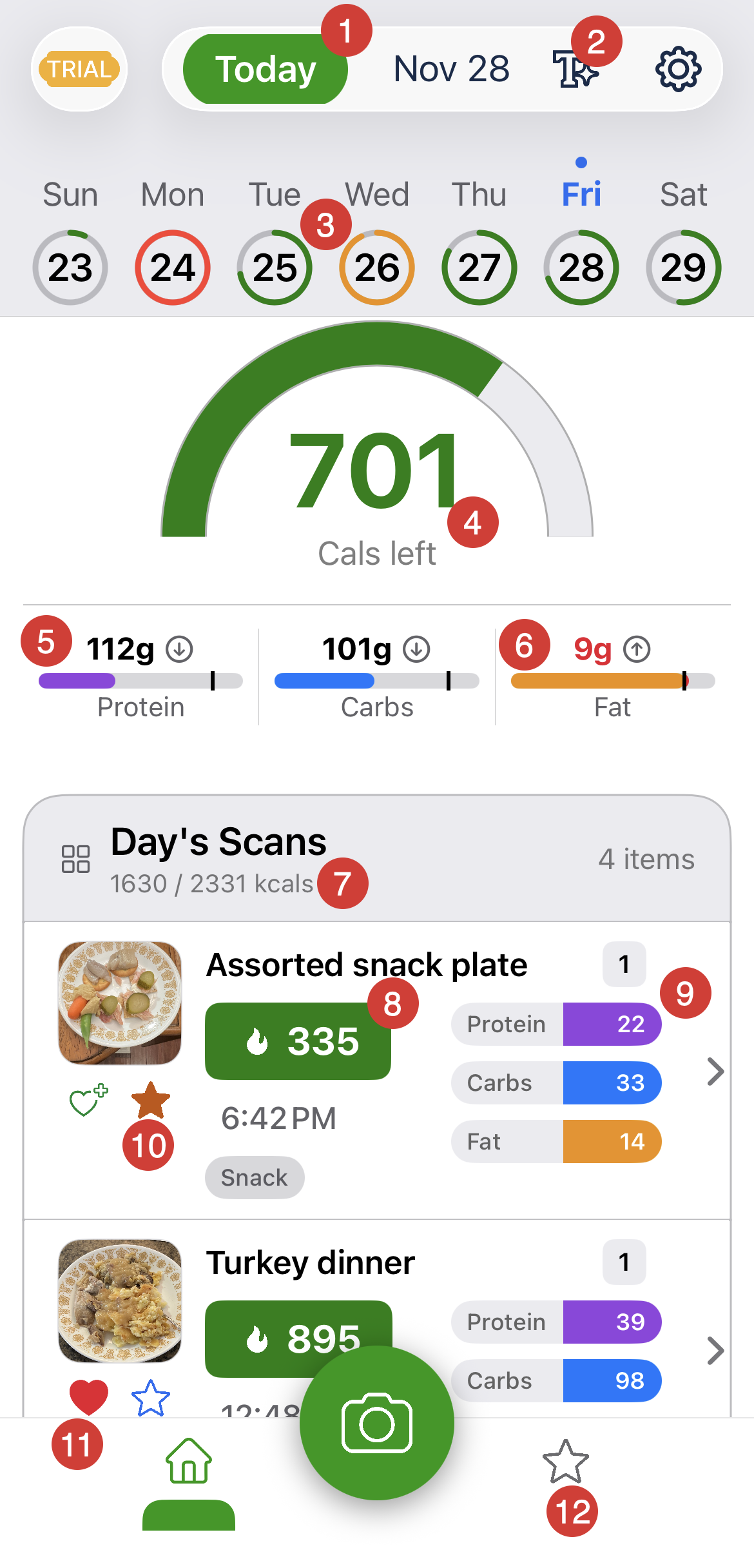
1. Today button – Displayed when you're not on today; tap to return to today.
2. AI Text Scan – Forgot the photo? Tap to enter a meal description and AI will analyze it just like a scan.
3. Daily Status Rings – Visual calorie progress per day (green/on target, orange/near limit, red/over).
4. Calories Left Gauge – Shows remaining calories for the day based on your target.
5. Macro Indicator – Grams consumed; black text and down arrow means below target by that amount.
6. Macro Indicator – Grams consumed; red text and up arrow means over target by that amount.
7. Day's Scans Summary – Total logged calories for the day vs. daily goal.
8. Meal Calories – Shows total calories for each scan.
9. Meal Macro Bars – Protein, carb, and fat breakdown for each scan.
10. Favorites Icon – If filled, this meal has been saved to favorites.
11. Apple Health Icon – If filled, this meal has been saved to Apple Health
12. Favorites Tab – Opens the Favorites list for quick access.
Was this article helpful?
That’s Great!
Thank you for your feedback
Sorry! We couldn't be helpful
Thank you for your feedback
Feedback sent
We appreciate your effort and will try to fix the article